SSH Persistence Redux: Multiple sites and Crontab Laziness

Inspired by a pretty good write up by Cynofield as to his setup for getting a Raspberry Pi to “phone home”, I thought I’d set out how I do it. I have a machine that lives behind a ‘security’ infrastructure that makes my life a living hell. As a result, I set up automatic persistent reverse shells going back to other machines I use, so if I connect to those machines, I can get into the secure environment, without anything nasty being able to get in with me. ...
July 6, 2013 · Andrew Bolster

Accidentally Proper Kindle PDF Document Conversion

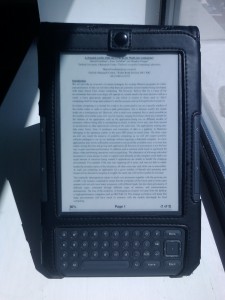
I’ve discovered a strange undocumented* ‘feature’ of the Amazon Kindle document Delivery system. As it stands, if you send a document to [email protected] or @kindle.com, the document is sent onto your device at its convenience. Generally this is fine, but for most documents that people actually use (PDFs) this can be a pain as the service says it does not support PDF reflow, and on a smaller than A4/Letter screen, lovely documents end up looking like this… ...

May 23, 2011 · Andrew Bolster

Customised User Directories in Ubuntu

I’ve been doing alot of messing around in Ubuntu recently and there are lots of tweaks I like to make. One of them being to show the contents of my home folder as my desktop; I don’t need any more pointless folders…. Dead easy, there is a .config directory under your $HOME dir, containing several files. The one we need is user-dirs.dirs , and it looks something like this. # This file is written by xdg-user-dirs-update # If you want to change or add directories, just edit the line you're # interested in. All local changes will be retained on the next run # Format is XDG_xxx_DIR="$HOME/yyy", where yyy is a shell-escaped # homedir-relative path, or XDG_xxx_DIR="/yyy", where /yyy is an # absolute path. No other format is supported. # XDG_DESKTOP_DIR="$HOME/Desktop" XDG_DOWNLOAD_DIR="$HOME/Downloads" XDG_TEMPLATES_DIR="$HOME/Templates" XDG_PUBLICSHARE_DIR="$HOME/Public" XDG_DOCUMENTS_DIR="$HOME/Documents" XDG_MUSIC_DIR="$HOME/Music" XDG_PICTURES_DIR="$HOME/Pictures" XDG_VIDEOS_DIR="$HOME/Videos" And this is what I changed mine to ...

June 1, 2010 · Andrew Bolster

Line Parsing Reminder (Duplicate removal)

So, say you have a long list of instruction (like multiple apt-get install lines) and you want to eliminate common words? Easiest way to do it is (assuming you have all of the instrustions in “list.txt”) [FYI the ‘' character indicates a continuation of a single line ] cat list.txt\ | tr ’ ’ ‘\n’ \ #Expands all space characters to new lines | sort | uniq \ #sorts each line, and then eliminates duplicates ...

March 12, 2010 · Andrew Bolster